Black Friday is one of the most commercially important days of the year, and that’s why so many brands worry about their Black Friday tracking.
With very high budgets and peaking traffic numbers, every conversion counts as well as every data point behind these conversions. In the weeks before Black Friday marketing and analytics teams work hard to build tracking setups and implement new tags to be ready before the Black Friday campaigns go live. With that kind of time pressure, it’s easy for something to break without anyone noticing.
In this blog we describe how most brands currently prepare for Black Friday and why that way of working is outdated.
Why tracking matters most on Black Friday
In 2025 according to Salesforce, there was $79 billion generated in global sales on Black Friday. Cyber Monday generated $53 billion in global sales.
Now imagine tracking breaking during the peak hours of Black Friday. Ad platforms receive wrong data when it matters most. They then optimize based on bad data, badly hurting the ROAS in the period of the year with the highest ad budget. A nightmare for agencies or performance marketing teams. Imagine having to explain to your boss that tracking issues arose on Black Friday of all days.
Why tracking typically breaks on or right before Black Friday
At Code-Cube.io we see that most issues come from a simple source. Yes, engineering teams typically lock down deployments two weeks before the holiday weekend. That doesn’t sound too bad and is well on time before the holiday weekend starts. But think for a moment about the marketing side of things. Does the marketing department have everything ready two weeks before the holiday? The answer is no. Marketing teams are by nature dynamic. They need to push last minute promos, pixels and make Google Tag Manager (GTM) tag changes. Making these changes comes with an increased risk of your Black Friday tracking breaking silently. When that happens, it’s often hard to know what part of your data collection has been impacted until after the holiday weekend.
The current checklist most brands use
So what is the best way to ensure tracking is pristine before the shopping weekend? Until now, most brands have been manually checking whether their Black Friday tracking was ready. The following pillars of tracking QA are still being widely used, despite their downsides.
1. Audit your GTM container
It takes someone from your team a few hours, but it’s doable and still a very common way to prepare your tracking for the holiday weekend. You export your GTM container(s) and list tags, triggers and variables. You mark the most essential ones like the purchase event and its value, add_to_cart, Google Ads etc.
Also, you clean up your container by removing paused, duplicate and legacy tags. This way, you prevent one of the old elements from firing by accident and inflating purchase data, causing bidding algorithms to be affected.
Auditing your tag container(s) can be quite frustrating, boring and time consuming work for the person that’s responsible for it. Manually auditing your GTM container works, but it’s not something you do once and be done with. This process has to be repeated every so often, taking up your team’s time every time.
2. Test the full purchase funnel
This is a tedious task and takes up a large chunk of someone’s time but it has to be done. In GTM, you can use the Tag Assistant and go through the customer journey and test if tags work and fire as expected. For example, you can navigate the website, add a product to cart, go to checkout and test the payment. For these steps make sure the right tags fire once (not zero, not twice) and also keep an eye on your dataLayer to make sure it transfers the correct values.
Repeat these steps for the different funnels and scenario’s. Some examples are:
Black Friday pricing and discount codes. The different pricing should also reflect a different revenue value than normal.
Guest checkout and account checkout. Mobile and desktop. Different browsers.
Refreshes on the purchase confirmation page. Sometimes refreshing can cause duplicate purchase data.
Ensuring external payment providers work as intended.
Purchases sent from both the browser and the server. If you send conversions to Meta or Google both client-side and server-side, check that each event carries the same event ID or transaction ID, so the platform deduplicates it instead of counting the sale twice.
3. Test consent mode
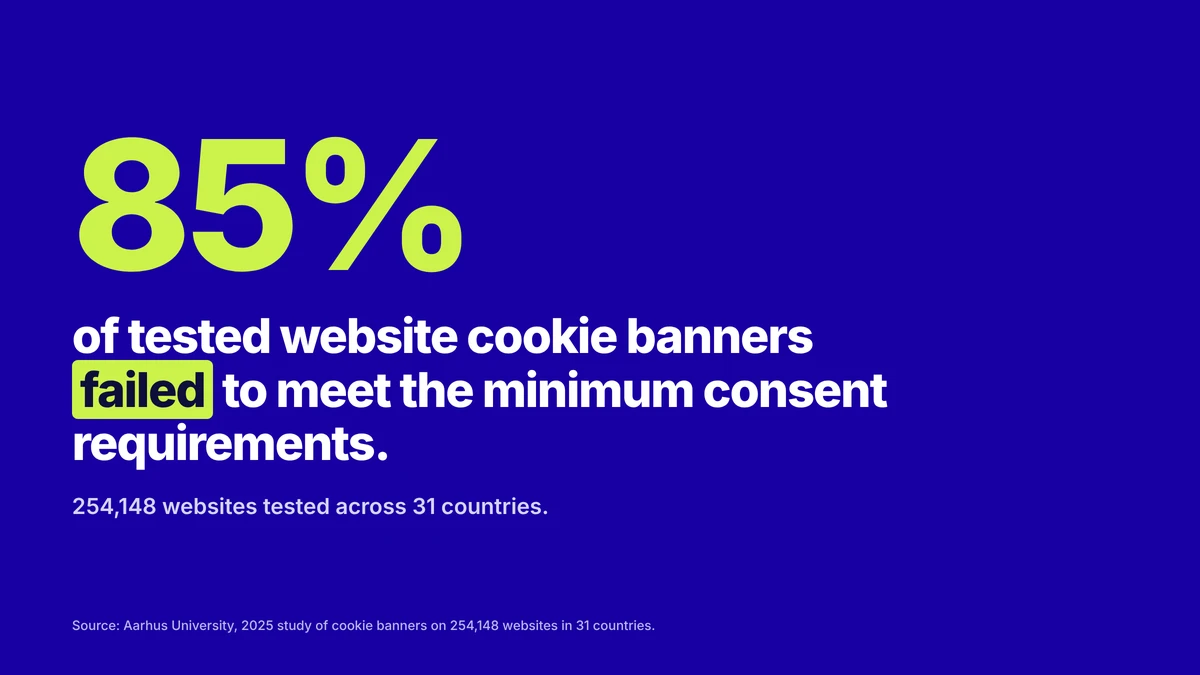
A study in 2025 published by researchers of the Aarhus University reported that 85% of tested website cookie banners failed to meet the minimum consent requirements. They tested 254,148 sites across 31 countries. Violating cookie consent rules can result in hefty fines. For example, Shein was fined €150 million by the CNIL in 2025 for placing cookies without consent.
To confirm if your website’s cookies meet the consent rules, you can manually test if data collection works as promised by running through the cookie banner and testing ‘only essential’, ‘accept all’ and the different partial options. Check if tags respect the different consent choices and that consent mode signals are sent correctly without violating consent rules. Also check that banner changes don’t block essential marketing tags from working properly, this is a well known reason for drops in conversion data.
4. Verify data in GA4 and ad platforms
It’s crucial to check if data actually arrives in your analytics and ad platforms. For example, check GA4 DebugView. When data is missing or is incorrect, you need to start a debugging process.
Even when doing all of the above it’s easy to make a small mistake or overlook a detail. After the weekend, when you compare the orders in your backend with the purchases reported in GA4 and your ad platforms, it might turn out that there is a large difference on a specific device, browser or for a specific campaign. By then the damage is already done and you will not be able to ever retrieve that missed data.
A perfect tracking setup is nearly impossible. Or is it?
You probably know like no other how much work it takes to keep your tracking reliable, especially around holiday peak moments. And the steps described above are just the tip of the iceberg.
In fact making sure your tracking setup is perfect and unbreakable requires a lot more work and is impossible to do manually. So isn’t there a better solution? Yes, there is, and top brands are starting to realize that no modern marketing stack is complete without it: Automated tracking QA and monitoring.
The only scalable way forward: automated monitoring
Securing and checking your tracking manually before and during Black Friday is not sustainable and scalable as it means you never find all the bugs, or you will never find them on time.
The purchase tag stops firing at 11a.m. because someone changed a promo banner. Smart Bidding sees conversions drop and lowers bids. Nobody notices until the day after. A simple mistake on Black Friday hurts revenue, can cause a significantly lower ROAS and that’s why automated tracking tools are gaining traction by large and forward thinking companies.
The case for SaaS “always on” monitoring
More and more businesses start to look for alternatives to tackle the challenges as described.
A monitoring solution, whether built inhouse or through an external vendor, removes the frustration and many downsides of manual QA. With a proper solution, teams get alerted instantly when tracking breaks. Your organization will never have to suffer from ‘silent tracking errors, your complete data pipeline will be monitored 24/7 and if you choose your solution well, your team even gets solutions offered per issue to fix the broken tracking faster than ever before. The business case is a no-brainer.
In the days leading up to Black Friday, organizations all over the world feel the pain of manual QA. You can ask your technical web analyst or agency… The logical result is that the awareness for automated monitoring tools is increasing.
There are a few very good automated monitoring tools on the market, and you will be surprised how affordable and easy to implement some can be.
Whether you are an agency or advertiser, you just deserve your advertising budgets to deliver the maximum ROAS, your team to spend time on valuable tasks and to have peace of mind about your tracking. It’s time to wake up, to break with the status quo and to start a (free) trial as soon as possible. Who would not want to start saving time instantly and have valuable insights by tomorrow?
Your path to error-free analytics starts here
Installation takes just a few clicks – no developers needed! We handle all the
setup for you. Ready to go?
The silent revenue leak that car brands cannot afford to ignore
Code-Cube.io · Market Analysis · Automotive Vertical · Data Observability · Marketing ROI · ⏱ ~6 min read
The silent revenue leak that car brands cannot afford to ignore
When a vehicle configurator breaks without raising a single alert, every visit from a high-intent buyer becomes a wasted impression and every euro of ad spend that brought them there evaporates. This is the data-quality crisis reshaping automotive digital marketing.
The most critical funnel in retail
Few industries operate digital user journeys as complex, or as commercially consequential, as automotive. A consumer configuring a new vehicle will interact with trim selectors, finance calculators, 360° walkarounds and dealer-lead forms, each interaction is a data event feeding campaign algorithms, attribution models and sales forecasting.
Consider the European business of a leading global car manufacturer. With over 2,000 sales outlets across Europe and a sales volume of over 500,000 vehicles per year, the brand’s website is the primary engine of lead generation for its entire dealer network. The online configurator is often the decisive moment of purchase intent. Getting a customer to complete the configuration step correlates directly with qualified dealer appointments.
So what happens when the configurator breaks? Not visibly, but silently at the network layer where tracking calls fail to complete and data simply disappears?
“A broken tag on a car configurator doesn’t announce itself. It just stops sending data and your entire marketing stack begins making decisions based on a lie.”
How configurators break and why nobody notices
Modern automotive websites are complex frontend achievements. A configurator is typically built as a dynamic single-page application, pulling options from a product catalogue API, updating finance calculations in real time via server-side calls and firing analytics events at each step via the browser’s dataLayer. This architecture is powerful but it creates multiple points of failure that traditional tag-monitoring tools simply do not see.
Standard tag-monitoring tools confirm that a tag fired. What they cannot verify is whether the data actually reached the analytics endpoint, whether the payload was correctly structured, or whether a network timeout, a privacy extension or a front-end deployment silently corrupted the outgoing request.
In this scenario, marketing reports show users entering the configurator and mysteriously dropping off. Attribution models incorrectly credit awareness channels. Performance Max and Meta Advantage+ campaigns, relying entirely on conversion signal quality, begin optimising towards the wrong users. No alert fires. The dataLayer told part of the truth. The network layer told none of it.
Calculating the damage
Industry benchmarks make the financial stakes concrete. Tealium and ObservePoint report that 30–50% of digital tracking data contains errors at any given time. Attribution inaccuracy runs at 40–50% in typical martech setups. IBM and Gartner estimate the average enterprise loses 12% of annual revenue to poor data quality, with up to 21 cents in every euro of media spend wasted as a direct result.
Assumptions
500k
Annual Unit Sales
Passenger vehicles across European markets
€35k
Average Transaction Value
Blended across fuel-powered and electric models
€17.5B
Total Revenue Base
Used as the baseline for revenue-loss modelling
€200M
Est. European Digital Media Spend
Conservative estimate for a large car brand across search, social, display
Risk Category
Benchmark Rate
Base Exposure
Estimated Annual Loss
Wasted media spend – poor tracking signals
30–40% of digital media
€200M media budget
€60M – €80M
Wasted media spend – data quality (21¢/$)
21% of media spend
€200M media budget
€42M
Attribution inaccuracy – misallocated budget
40–50% attribution error
€200M media budget
€80M – €100M
Configurator conversion loss – silent breaks
3–5% conversion degradation per incident
~42k qualified configurator leads/yr
1,250–2,100 missed leads
Conservative combined media waste (tracking quality alone)
€120M+ per annum
The hidden multiplier: When tracking breaks and a dealer lead fails to be attributed correctly, that dealer’s digital marketing budget is typically reduced in the next planning cycle (because the data says leads aren’t coming from that channel). Therefore broken tracking doesn’t just waste current spend; it suppresses future investment in channels that are actually working.
Flow Monitor: network-layer observability for complex funnels
The gap between a tag firing on the page and data arriving at its destination is where the most dangerous failures occur, a 500 error on the analytics endpoint, a missing authentication header on a server-side call, a JSON payload where model_id is sent as a string when an integer is expected. None of these are visible to tag monitoring tools. None generate front-end errors. They simply remove data from the record, silently and at scale.
Flow Monitor operates between the browser and the cloud, intercepting and validating every outgoing HTTP, XHR and WebSocket request. A configurator built as a single-page application dispatches analytics calls via the Fetch API or XMLHttpRequest, with no page reload to trigger standard tag evaluation. Standard DOM-layer monitoring sees nothing. Flow Monitor sees everything.
HTTP Health
Status & response tracking
Automatically surfaces 404, 500, and 403 responses on any outgoing analytics, pixel or API call, errors that front-end tools categorically cannot detect.
Header Validation
Mandatory header inspection
Verifies that authentication tokens, content-type declarations and cache-control headers are present and correctly configured on server-side tracking calls.
Payload Inspection
Raw XHR & Fetch interception
Intercepts and validates the JSON or query-string body of requests to GA4, Adobe Analytics, Meta CAPI and other endpoints, before they reach the server.
Ad-Tech Integrity
Third-party pixel delivery
Confirms that Meta, TikTok, Google Ads, and Bing pixels are not merely present on the page, but are actually completing successful data transmissions to their servers.
Server-Side GTM
Server-side tracking validation
Validates server-to-server tracking pings with correct authentication, closing the verification loop that client-side tools leave open by design.
Legacy Systems
Hard-coded call capture
For legacy architectures that bypass a centralised dataLayer entirely, Flow Monitor captures hard-coded tracking calls directly from the network stream.
The automotive case: a vertical that cannot tolerate blind spots
Automotive brands occupy a peculiar position in the digital advertising landscape. They are simultaneously among the largest spenders on paid media in Europe and among the most complex operators of digital customer journeys. Their primary conversion event, a dealer lead or test-drive booking, has an average value far exceeding any e-commerce transaction. And unlike e-commerce, where a failed conversion can be recovered with a cart abandonment email, a lost car configurator lead typically cannot be recaptured.
€42M
Media waste from data quality alone
At 21¢/€ on a €200M digital media budget (industry benchmark)
40–50%
Attribution inaccuracy rate
Typical in multi-touch setups without network-layer validation
2,000+
Dealer outlets at risk
Each receiving degraded lead data from mis-attributed digital campaigns
Real-time
Flow Monitor detection
Failures caught at the moment of occurrence, not in the next analytics review cycle
“For automotive brands, the configurator is not a feature. It is the commercial artery of the entire dealer network. Network-layer monitoring is not optional, it is fundamental.”
Conclusion: data quality is a commercial necessity
The automotive sector’s shift to digital-first retail has transferred enormous commercial leverage to the quality of data flowing through the analytics stack. For brands managing thousands of dealer touchpoints, hundreds of millions in media spend and product configurators that dominate the purchase funnel, the silent failure of a single tracking call is no longer a technical inconvenience. It is a commercial event with measurable revenue consequences.
The tools to prevent it exist. The industry benchmarks quantifying the cost of inaction are unambiguous. The question for marketing technology leaders in automotive is not whether to invest in data observability, it is how much longer they can afford to operate without it. In an industry where a single qualified lead can represent €35,000 in transaction value, the cost of a blind spot is self-evident.
See how much your funnel is leaking
Book a free 30-minute demo with the Code-Cube.io team. We’ll walk through your configurator or lead journey and show you exactly where network-layer failures are occurring, in your live environment, right now.
Code-Cube.io · Industry Trends · AI-Assisted Development · Tracking Quality · Marketing ROI · ⏱ ~4 min read
Anyone these days can produce code at the speed of light. Just describe what you want and let the AI generate it. The term “vibe coding” (building software by describing your goals in plain words to an AI assistant) exists only 1,5 years but has quickly become a mainstream way of working for developers as well as non-developers.
“AI makes writing code incredibly cheap and fast. The problem with vibe coding isn’t the speed. The problem is that our checking cannot keep up with that speed.”
With AI coding agents like Cursor, GitHub Copilot and the widely known Claude Code we generate in minutes what used to take days or weeks, we review it in seconds and push it live. We are basically flooding our systems with unverified code logic. As a result the main costs for companies are no longer writing the code but proving it actually works the way it should. Every shortcut that we take today becomes an issue we will discover later. Such issues usually come to the surface at the worst possible moments and in places nobody is looking. Trust, validation and data integrity are becoming extremely expensive.
This post explains why marketing data and analytics tracking are the first silent victims of vibe coding and why continuous monitoring of data tracking has become non-negotiable.
The recurring issue: code that looks right
AI-generated code usually fails in predictable ways and we now have the data to prove it.
A recent thread on Hacker News
hit the nail on the head. The author noticed that AI is amazing at spotting bugs, but when it tries to fix them, it goes totally overboard. It builds complex solutions for problems that aren’t even there, just because complex code looks impressive to a machine. It completely fails to keep it simple. Someone in the comments added the perfect warning: AI is only useful if you already know exactly what you’re doing. If you don’t, it’ll give you a broken plan that looks totally convincing and you won’t realize it’s wrong until it’s too late.
Researchers at Columbia’s DAPLab identified nine recurring failure patterns with vibe coding. The most serious ones? Error handling and business logic, exactly the failures that are silent. The code runs without errors but it doesn’t completely do what you asked.
And the real-world consequences are rapidly piling up. Crackr’s directory of documented vibe-coding incidents now lists 19 major failures, including Amazon where in March 2026 an AI-assisted deployment triggered a 6-hour outage (and an estimated 6.3 million lost orders!) and SaaStr where in July 2025 an AI agent (Replit) ignored a code freeze and deleted a complete live database. In October 2025 the cybersecurity firm Escape.tech scanned 5,600 vibe-coded apps and found over 2,000 high-impact vulnerabilities and over 400 exposed credentials like API keys.
What do these issues have in common according to Crackr? The code was deployed by people who didn’t understand it. It looked correct, passed a quick scan and went to production.
Why tracking is the first (and most silent) victim
When newly deployed code breaks something, the visible parts of your site get noticed fast. A broken checkout button for example generates a support ticket almost immediately. However, your dataLayer error doesn’t get noticed that fast nor does it get a support ticket.
Analytics and marketing tracking is very vulnerable to fast and unsufficiently reviewed deployment for three reasons:
1. Tracking breaks silently
The newly deployed website works normally, nothing crashes and users are happy. In the meantime, without anyone noticing, a tag silently stops firing and some events and conversions disappear. Your GA4 events, Meta Pixel and conversion tags are quietly sending no data, or worse, sending garbage until reporting and revenue get affected.
2. Tracking is fragile in itself
Your dataLayer depends on element IDs, event names, timing and page structure. An AI agent generating code doesn’t know that a div class was a GTM trigger. It doesn’t know the checkout event name is referred to in ten other tools. This is exactly what one commenter on Hacker News described: Claude Code edits the obvious file and stops. Sibling files and connected tools don’t get modified and become outdated.
3. Manual QA can’t keep up
The deployment frequency these days is too high and tracking rarely gets the same frequent QA as user-facing features. Multiply that fact by the speed of vibe coding. It is estimated that AI-generated code needs ten to twenty times more QA time than human-written code. In current practice most teams are doing the exact opposite: deploying more code with less review.
Bad data teaches smart algorithms wrong lessons
Broken tracking isn’t just a reporting inconvenience. It corrupts the systems that spend your money and generate your revenue. Performance marketing platforms like Google and Meta optimize toward the tracked conversions. If they receive incomplete or wrong data, the algorithms optimize on incorrect signals and waste ad spend and you miss revenue.
Missing UTM parameters, broken pixels and dropped events create gaps in attribution that make good campaigns look bad and bad campaigns look fine. Your budget flows to the wrong places. Once stakeholders discover a gap in the reporting, they stop trusting the dashboards. Any data gap will live forever in your reporting history. This makes comparisons over time unreliable and it forces your team to continuously look back at past performance with an asterisk or annotation in Google Analytics.
“Tracking breaks most often after front-end changes, tag edits and new releases. Now consider the speed of new releases with AI generated code.”
Vibe coding means significantly more front-end changes and releases per week. More releases multiplied by unchanged or reduced QA means a rising probability that at any given moment, something in your measurement stack is broken and nobody knows.
The answer isn’t slowing down. It’s monitoring
Realistically, nobody is going to use AI coding assistants less because its speed and advantages are truly valuable and convenient. There is no other option than to accept that human review and manual QA no longer can keep up with development- and deployment speed. Organisations need an automated safety net where silent failures happen. And that’s where tracking and marketing observability solutions are coming in.
Tools like Code-Cube.io’s Tag Monitor and DataLayer Guard offer continuous, automated validation instead of manual QA. The solution continuously validates that every event, parameter and tag fires correctly. A good monitoring tool catches the hidden failures that don’t crash your site but that corrupt your data. It alerts your team within minutes instead of weeks.
Now is the time to shift from manual checks (which no longer match your release frequency) to always-on monitoring.
Conclusion
Vibe coding lets you down for a simple reason: there is a huge discrepancy between the speed of producing code and the speed of understanding that code.
The visible failures like outages, breaches and wiped databases make it to the news. The more likely and more expensive failure for most companies however is invisible: a tracking setup that quietly degrades with every AI-assisted release, feeding bad data to the algorithms and dashboards that lead your marketing spend.
Is your team deploying faster than ever? Then your measurement stack needs a monitor that never sleeps. Because the most expensive bug is the one nobody notices.
See how much your funnel is leaking
Book a free 30-minute demo with the Code-Cube.io team. We’ll walk through your tracking set-up and show you exactly where errors are occurring.
The silent revenue leak that car brands cannot afford to ignore
Code-Cube.io · Market Analysis · Automotive Vertical · Data Observability · Marketing ROI · ⏱ ~6 min read
The silent revenue leak that car brands cannot afford to ignore
When a vehicle configurator breaks without raising a single alert, every visit from a high-intent buyer becomes a wasted impression and every euro of ad spend that brought them there evaporates. This is the data-quality crisis reshaping automotive digital marketing.
The most critical funnel in retail
Few industries operate digital user journeys as complex, or as commercially consequential, as automotive. A consumer configuring a new vehicle will interact with trim selectors, finance calculators, 360° walkarounds and dealer-lead forms, each interaction is a data event feeding campaign algorithms, attribution models and sales forecasting.
Consider the European business of a leading global car manufacturer. With over 2,000 sales outlets across Europe and a sales volume of over 500,000 vehicles per year, the brand’s website is the primary engine of lead generation for its entire dealer network. The online configurator is often the decisive moment of purchase intent. Getting a customer to complete the configuration step correlates directly with qualified dealer appointments.
So what happens when the configurator breaks? Not visibly, but silently at the network layer where tracking calls fail to complete and data simply disappears?
“A broken tag on a car configurator doesn’t announce itself. It just stops sending data and your entire marketing stack begins making decisions based on a lie.”
How configurators break and why nobody notices
Modern automotive websites are complex frontend achievements. A configurator is typically built as a dynamic single-page application, pulling options from a product catalogue API, updating finance calculations in real time via server-side calls and firing analytics events at each step via the browser’s dataLayer. This architecture is powerful but it creates multiple points of failure that traditional tag-monitoring tools simply do not see.
Standard tag-monitoring tools confirm that a tag fired. What they cannot verify is whether the data actually reached the analytics endpoint, whether the payload was correctly structured, or whether a network timeout, a privacy extension or a front-end deployment silently corrupted the outgoing request.
In this scenario, marketing reports show users entering the configurator and mysteriously dropping off. Attribution models incorrectly credit awareness channels. Performance Max and Meta Advantage+ campaigns, relying entirely on conversion signal quality, begin optimising towards the wrong users. No alert fires. The dataLayer told part of the truth. The network layer told none of it.
Calculating the damage
Industry benchmarks make the financial stakes concrete. Tealium and ObservePoint report that 30–50% of digital tracking data contains errors at any given time. Attribution inaccuracy runs at 40–50% in typical martech setups. IBM and Gartner estimate the average enterprise loses 12% of annual revenue to poor data quality, with up to 21 cents in every euro of media spend wasted as a direct result.
Assumptions
500k
Annual Unit Sales
Passenger vehicles across European markets
€35k
Average Transaction Value
Blended across fuel-powered and electric models
€17.5B
Total Revenue Base
Used as the baseline for revenue-loss modelling
€200M
Est. European Digital Media Spend
Conservative estimate for a large car brand across search, social, display
Risk Category
Benchmark Rate
Base Exposure
Estimated Annual Loss
Wasted media spend – poor tracking signals
30–40% of digital media
€200M media budget
€60M – €80M
Wasted media spend – data quality (21¢/$)
21% of media spend
€200M media budget
€42M
Attribution inaccuracy – misallocated budget
40–50% attribution error
€200M media budget
€80M – €100M
Configurator conversion loss – silent breaks
3–5% conversion degradation per incident
~42k qualified configurator leads/yr
1,250–2,100 missed leads
Conservative combined media waste (tracking quality alone)
€120M+ per annum
The hidden multiplier: When tracking breaks and a dealer lead fails to be attributed correctly, that dealer’s digital marketing budget is typically reduced in the next planning cycle (because the data says leads aren’t coming from that channel). Therefore broken tracking doesn’t just waste current spend; it suppresses future investment in channels that are actually working.
Flow Monitor: network-layer observability for complex funnels
The gap between a tag firing on the page and data arriving at its destination is where the most dangerous failures occur, a 500 error on the analytics endpoint, a missing authentication header on a server-side call, a JSON payload where model_id is sent as a string when an integer is expected. None of these are visible to tag monitoring tools. None generate front-end errors. They simply remove data from the record, silently and at scale.
Flow Monitor operates between the browser and the cloud, intercepting and validating every outgoing HTTP, XHR and WebSocket request. A configurator built as a single-page application dispatches analytics calls via the Fetch API or XMLHttpRequest, with no page reload to trigger standard tag evaluation. Standard DOM-layer monitoring sees nothing. Flow Monitor sees everything.
HTTP Health
Status & response tracking
Automatically surfaces 404, 500, and 403 responses on any outgoing analytics, pixel or API call, errors that front-end tools categorically cannot detect.
Header Validation
Mandatory header inspection
Verifies that authentication tokens, content-type declarations and cache-control headers are present and correctly configured on server-side tracking calls.
Payload Inspection
Raw XHR & Fetch interception
Intercepts and validates the JSON or query-string body of requests to GA4, Adobe Analytics, Meta CAPI and other endpoints, before they reach the server.
Ad-Tech Integrity
Third-party pixel delivery
Confirms that Meta, TikTok, Google Ads, and Bing pixels are not merely present on the page, but are actually completing successful data transmissions to their servers.
Server-Side GTM
Server-side tracking validation
Validates server-to-server tracking pings with correct authentication, closing the verification loop that client-side tools leave open by design.
Legacy Systems
Hard-coded call capture
For legacy architectures that bypass a centralised dataLayer entirely, Flow Monitor captures hard-coded tracking calls directly from the network stream.
The automotive case: a vertical that cannot tolerate blind spots
Automotive brands occupy a peculiar position in the digital advertising landscape. They are simultaneously among the largest spenders on paid media in Europe and among the most complex operators of digital customer journeys. Their primary conversion event, a dealer lead or test-drive booking, has an average value far exceeding any e-commerce transaction. And unlike e-commerce, where a failed conversion can be recovered with a cart abandonment email, a lost car configurator lead typically cannot be recaptured.
€42M
Media waste from data quality alone
At 21¢/€ on a €200M digital media budget (industry benchmark)
40–50%
Attribution inaccuracy rate
Typical in multi-touch setups without network-layer validation
2,000+
Dealer outlets at risk
Each receiving degraded lead data from mis-attributed digital campaigns
Real-time
Flow Monitor detection
Failures caught at the moment of occurrence, not in the next analytics review cycle
“For automotive brands, the configurator is not a feature. It is the commercial artery of the entire dealer network. Network-layer monitoring is not optional, it is fundamental.”
Conclusion: data quality is a commercial necessity
The automotive sector’s shift to digital-first retail has transferred enormous commercial leverage to the quality of data flowing through the analytics stack. For brands managing thousands of dealer touchpoints, hundreds of millions in media spend and product configurators that dominate the purchase funnel, the silent failure of a single tracking call is no longer a technical inconvenience. It is a commercial event with measurable revenue consequences.
The tools to prevent it exist. The industry benchmarks quantifying the cost of inaction are unambiguous. The question for marketing technology leaders in automotive is not whether to invest in data observability, it is how much longer they can afford to operate without it. In an industry where a single qualified lead can represent €35,000 in transaction value, the cost of a blind spot is self-evident.
See how much your funnel is leaking
Book a free 30-minute demo with the Code-Cube.io team. We’ll walk through your configurator or lead journey and show you exactly where network-layer failures are occurring, in your live environment, right now.
The silent revenue leak that car brands cannot afford to ignore
Code-Cube.io · Market Analysis · Automotive Vertical · Data Observability · Marketing ROI · ⏱ ~6 min read
When a vehicle configurator breaks without raising a single alert, every visit from a high-intent buyer becomes a wasted impression and every euro of ad spend that brought them there evaporates. This is the data-quality crisis reshaping automotive digital marketing.
The most critical funnel in retail
Few industries operate digital user journeys as complex, or as commercially consequential, as automotive. A consumer configuring a new vehicle will interact with trim selectors, finance calculators, 360° walkarounds and dealer-lead forms, each interaction is a data event feeding campaign algorithms, attribution models and sales forecasting.
Consider the European business of a leading global car manufacturer. With over 2,000 sales outlets across Europe and a sales volume of over 500,000 vehicles per year, the brand’s website is the primary engine of lead generation for its entire dealer network. The online configurator is often the decisive moment of purchase intent. Getting a customer to complete the configuration step correlates directly with qualified dealer appointments.
So what happens when the configurator breaks? Not visibly, but silently at the network layer where tracking calls fail to complete and data simply disappears?
“A broken tag on a car configurator doesn’t announce itself. It just stops sending data and your entire marketing stack begins making decisions based on a lie.”
How configurators break and why nobody notices
Modern automotive websites are complex frontend achievements. A configurator is typically built as a dynamic single-page application, pulling options from a product catalogue API, updating finance calculations in real time via server-side calls and firing analytics events at each step via the browser’s dataLayer. This architecture is powerful but it creates multiple points of failure that traditional tag-monitoring tools simply do not see.
Standard tag-monitoring tools confirm that a tag fired. What they cannot verify is whether the data actually reached the analytics endpoint, whether the payload was correctly structured, or whether a network timeout, a privacy extension or a front-end deployment silently corrupted the outgoing request.
In this scenario, marketing reports show users entering the configurator and mysteriously dropping off. Attribution models incorrectly credit awareness channels. Performance Max and Meta Advantage+ campaigns, relying entirely on conversion signal quality, begin optimising towards the wrong users. No alert fires. The dataLayer told part of the truth. The network layer told none of it.
Calculating the damage
Industry benchmarks make the financial stakes concrete. Tealium and ObservePoint report that 30–50% of digital tracking data contains errors at any given time. Attribution inaccuracy runs at 40–50% in typical martech setups. IBM and Gartner estimate the average enterprise loses 12% of annual revenue to poor data quality, with up to 21 cents in every euro of media spend wasted as a direct result.
Assumptions
500k
Annual Unit Sales
Passenger vehicles across European markets
€35k
Average Transaction Value
Blended across fuel-powered and electric models
€17.5B
Total Revenue Base
Used as the baseline for revenue-loss modelling
€200M
Est. European Digital Media Spend
Conservative estimate for a large car brand across search, social, display
Risk Category
Benchmark Rate
Base Exposure
Estimated Annual Loss
Wasted media spend – poor tracking signals
30–40% of digital media
€200M media budget
€60M – €80M
Wasted media spend – data quality (21¢/$)
21% of media spend
€200M media budget
€42M
Attribution inaccuracy – misallocated budget
40–50% attribution error
€200M media budget
€80M – €100M
Configurator conversion loss – silent breaks
3–5% conversion degradation per incident
~42k qualified configurator leads/yr
1,250–2,100 missed leads
Conservative combined media waste (tracking quality alone)
€120M+ per annum
The hidden multiplier: When tracking breaks and a dealer lead fails to be attributed correctly, that dealer’s digital marketing budget is typically reduced in the next planning cycle (because the data says leads aren’t coming from that channel). Therefore broken tracking doesn’t just waste current spend; it suppresses future investment in channels that are actually working.
Flow Monitor: network-layer observability for complex funnels
The gap between a tag firing on the page and data arriving at its destination is where the most dangerous failures occur, a 500 error on the analytics endpoint, a missing authentication header on a server-side call, a JSON payload where model_id is sent as a string when an integer is expected. None of these are visible to tag monitoring tools. None generate front-end errors. They simply remove data from the record, silently and at scale.
Flow Monitor operates between the browser and the cloud, intercepting and validating every outgoing HTTP, XHR and WebSocket request. A configurator built as a single-page application dispatches analytics calls via the Fetch API or XMLHttpRequest, with no page reload to trigger standard tag evaluation. Standard DOM-layer monitoring sees nothing. Flow Monitor sees everything.
HTTP Health
Status & response tracking
Automatically surfaces 404, 500, and 403 responses on any outgoing analytics, pixel or API call, errors that front-end tools categorically cannot detect.
Header Validation
Mandatory header inspection
Verifies that authentication tokens, content-type declarations and cache-control headers are present and correctly configured on server-side tracking calls.
Payload Inspection
Raw XHR & Fetch interception
Intercepts and validates the JSON or query-string body of requests to GA4, Adobe Analytics, Meta CAPI and other endpoints, before they reach the server.
Ad-Tech Integrity
Third-party pixel delivery
Confirms that Meta, TikTok, Google Ads, and Bing pixels are not merely present on the page, but are actually completing successful data transmissions to their servers.
Server-Side GTM
Server-side tracking validation
Validates server-to-server tracking pings with correct authentication, closing the verification loop that client-side tools leave open by design.
Legacy Systems
Hard-coded call capture
For legacy architectures that bypass a centralised dataLayer entirely, Flow Monitor captures hard-coded tracking calls directly from the network stream.
The automotive case: a vertical that cannot tolerate blind spots
Automotive brands occupy a peculiar position in the digital advertising landscape. They are simultaneously among the largest spenders on paid media in Europe and among the most complex operators of digital customer journeys. Their primary conversion event, a dealer lead or test-drive booking, has an average value far exceeding any e-commerce transaction. And unlike e-commerce, where a failed conversion can be recovered with a cart abandonment email, a lost car configurator lead typically cannot be recaptured.
€42M
Media waste from data quality alone
At 21¢/€ on a €200M digital media budget (industry benchmark)
40–50%
Attribution inaccuracy rate
Typical in multi-touch setups without network-layer validation
2,000+
Dealer outlets at risk
Each receiving degraded lead data from mis-attributed digital campaigns
Real-time
Flow Monitor detection
Failures caught at the moment of occurrence, not in the next analytics review cycle
“For automotive brands, the configurator is not a feature. It is the commercial artery of the entire dealer network. Network-layer monitoring is not optional, it is fundamental.”
Conclusion: data quality is a commercial necessity
The automotive sector’s shift to digital-first retail has transferred enormous commercial leverage to the quality of data flowing through the analytics stack. For brands managing thousands of dealer touchpoints, hundreds of millions in media spend and product configurators that dominate the purchase funnel, the silent failure of a single tracking call is no longer a technical inconvenience. It is a commercial event with measurable revenue consequences.
The tools to prevent it exist. The industry benchmarks quantifying the cost of inaction are unambiguous. The question for marketing technology leaders in automotive is not whether to invest in data observability, it is how much longer they can afford to operate without it. In an industry where a single qualified lead can represent €35,000 in transaction value, the cost of a blind spot is self-evident.
See how much your funnel is leaking
Book a free 30-minute demo with the Code-Cube.io team. We’ll walk through your configurator or lead journey and show you exactly where network-layer failures are occurring, in your live environment, right now.
To give you total control over your workspace, we’ve added a new toggle switch that lets you hide or show tags which were excluded from alerting.
If you’ve silenced alerts for a slow partner tag or a niche vendor, you can now hide it from your dashboard entirely to focus on what matters.
The toggle switch is only visible if you have excluded tags and provides a cleaner interface for large tracking setups while keeping your “ignored” tags just one click away.
We’ve improved our documentation library with advanced site search to help you find exactly what you’re looking for.
We’ve added Sign in with Google to make accessing your account faster and more secure. Just one click and you’re in:
You can now download a live blueprint of your dataLayer (or any other frontend object) directly from the DataLayer Guard:
Forget manual spreadsheets that go out of date the moment a developer pushes code. With exports available in PDF or XLS, you now have a “single source of truth” that is always up to date , can quickly be shared with developers or marketing.
Skip the manual formatting. Your measurement plan is now just one click away.
We’re reaching out to share an update to our Tag Monitor alert frequency.
What’s changing from today?
From today you’ll receive more focused Tag Monitor alerts, helping you stay on top of what truly matters:
Previously reported errors will no longer trigger daily repeat alerts;
You will only receive notifications for newly detected errors, or in case of a significant drop;
The thresholds for a significant drop (default 10% absolutely- and 50% relatively) can be changed in the portal;
A summary will be sent on a weekly basis.
This change affects alerts via email, Slack, Microsoft Teams and other channels. If you previously set Tag Volume Monitoring to a 24-hour frequency due to email volume, you can now safely switch it back to hourly monitoring thanks to improved deduplication.
What else has changed?
Although we do not display or possess any privacy-sensitive data, we have added two-factor authentication (2FA) to the portal to add an extra layer of security when logging in.
What’s coming next
The AI Enricher provides diagnostic context for each tracking error, including its severity, the location of the error in your data collection, and recommended potential solutions based on similar historical patterns.
Currently it is being tested by a few selected customers and after that it will become available for Tag Monitor Premium and Enterprise users.
Thanks for using Code-Cube.io and if you have any questions about this update, we’re happy to walk you through it.
And finally, we’re proud to announce we’re working with some of the globe’s most iconic brands: Coca-Cola, Levi’s, The North Face, and Vans, among others.
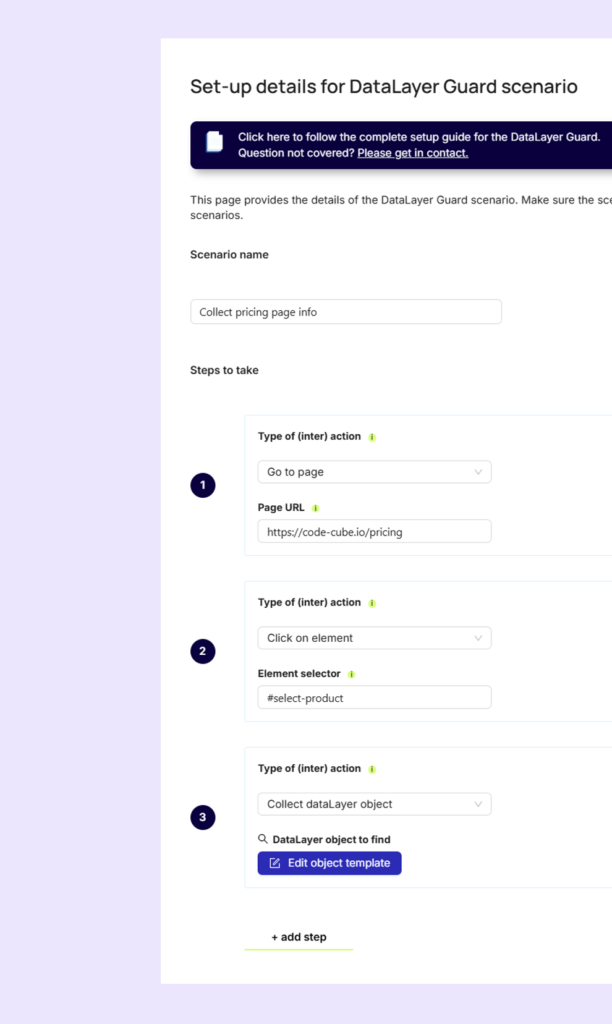
With DataLayer Guard scenarios, you take full control of your dataLayer monitoring. The new version is smarter than ever, letting you capture any interaction you can imagine. Clicks, add-to-carts, form submits… you name it.
DataLayer Guard 2.0 gives you the freedom to implement any interaction you can imagine and automatically activates the monitoring behind it. Simple to set up, powerful in action.
Want to learn more about this new feature? Send us an email and we will be happy to help.
Coming soon! AI enricher helps you fixing errors
We’re piloting an exciting new feature with a few of our agency partners. The AI Enricher provides detailed diagnostic context for every tracking error, including its severity level, the exact point of failure in your data collection flow, and recommended possible fixes based on similar historical patterns.
Want to be part of the next test? Let us know by replying to this email!
Google’s Performance Max (PMax) campaigns are powerful, but they’re only as effective as the data you feed them. When conversion tags don’t load correctly, the algorithm can’t optimize toward what really matters. The results are wasted budget, lost revenue, and a disrupted learning curve.
Let’s dive a bit deeper in how PMax works, what happens when data is missing, and why fixing measurement errors quickly is crucial for your business.
1. How Google Performance Max (PMax) works
Performance Max is a goal-based campaign type in Google Ads that uses machine learning to optimize performance across all of Google’s channels from search to display, to YouTube, Gmail and more.
You provide a budget, conversion goals (like purchases or leads), creatives and so called audience signals (to help PMax understand your ideal target audience). Then the algorithm decides which channels to use, which ad creatives to show and how much to bid in each auction.
The core input for optimization in PMax is conversion data. The system needs accurate feedback on which clicks or views actually lead to real business results. In order to receive such accurate input, PMax relies on conversion tags.
Unfortunately there are many reasons that can cause errors in such tags. The most common causes are code being removed or overwritten by site updates, version rollbacks or deployments and redesign.
It’s also common that the tag manager is misconfigured, leading to wrong triggers, leading to conflicts with other tags or causing a tag to fire more than once resulting in duplication or blocking.
2. Impact of a conversion tag not loading correctly
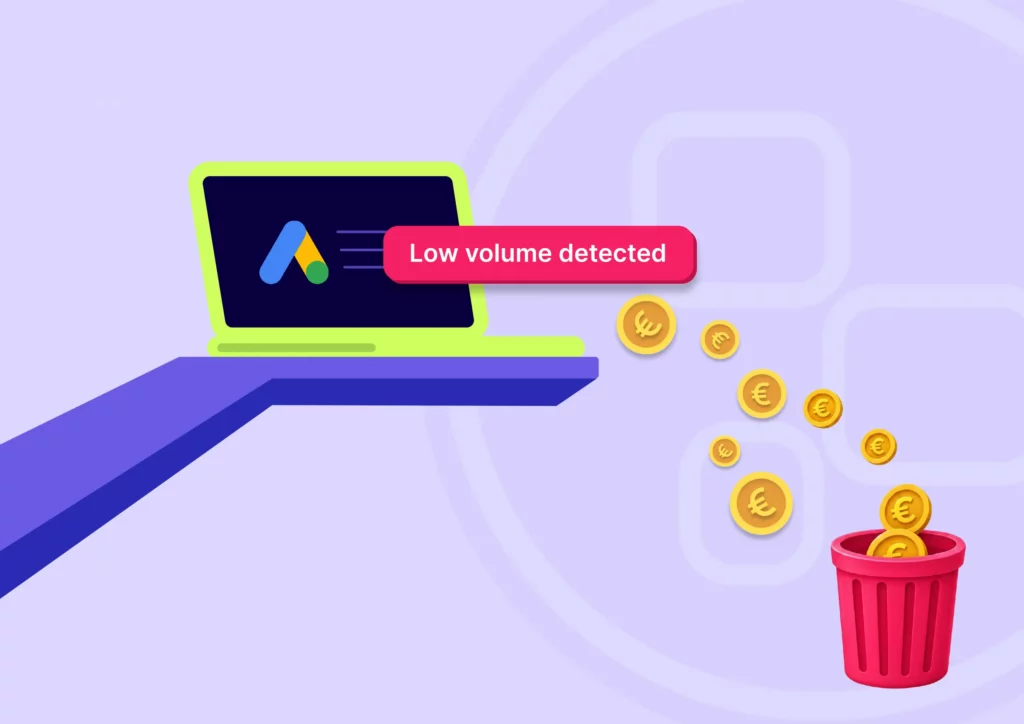
If your conversion tag doesn’t fire or loads inconsistently, Google’s optimization is effectively blinded. Google’s algorithm thinks some traffic isn’t converting, so it reduces spend there.
You waste budget because spending shifts toward cheap clicks or impressions that don’t actually convert. You end up paying for traffic without getting the real sales signals the system needs.
Also you will lose revenue as high-value traffic sources may be underfunded because their conversions aren’t recorded. As a result effective channels get scaled down, leading to fewer overall sales.
3. Impact of incomplete or missing data on the algorithm
Most companies already monitor uptime, server health, and even SEO. But what about the actual data being collected from users? If a tracking tag breaks, a dataLayer variable changes, or a marketing pixel stops firing, you may not notice until revenue drops or campaigns underperform.
A tag that is misfiring for a few hours up to a few days leads to short-term data loss. The PMax system may misinterpret signals and reallocate budget poorly. Some inefficiency occurs, but performance can bounce back quickly once fixed.
When a tag is not firing several days or more the algorithm starts to “re-learn” using incomplete data, damaging the targeting and bidding models and undoing weeks of optimization. And once an issue is found and resolved, the campaign requires a significant amount of fresh conversion data to train itself again.
4. How long does the impact last after fixing the tag?
With minor outages between several hours to a day the recovery usually takes between 1 to 3 days. Major outages of several days or weeks will take at least a similar recovery time. For example seven days of broken tracking often means seven up to fourteen of recovery. The reason is that machine learning models weigh recent history most heavily. Once accurate data is collected again, the system needs to rebuild confidence before it can scale efficiently.
The bottom line for Performance Marketers
A broken conversion tag = wasted budget + lost revenue.
The algorithm’s learning curve gets disrupted, leading to inefficient spending even after the issue is fixed.
Recovery time typically mirrors the outage length, until enough clean data is gathered again.
It is crucial for your business to detect errors as they happen and solve them immediately.
Conversion tracking isn’t a technical detail, it’s business-critical and therefore you need a tag monitoring solution like Code-Cube.io Tag Monitor which will detect any tag error instantly.
Reliable tagging ensures your PMax- and other performance campaigns allocate spend toward real customers, not just clicks.
Your path to error-free analytics starts here
Installation takes just a few clicks – no developers needed! We handle all the
setup for you. Ready to go?
Hiring technical web analysts has never been harder. The labor market is tight, the competition for digital talent is fierce, and the workload keeps growing. Marketing and analytics teams are expected to deliver accurate, actionable insights, and this while there is often a lack of capacity.
So how do you stay on top of your data when you’re understaffed and still expected to deliver high-performance results?
The answer is simple: just automate what slows you down.
The hidden time sink: manual data checks
Many teams still rely on manual checks to ensure their tracking setup is working. That means opening multiple containers, comparing dashboards, verifying event triggers, and searching for the root cause of discrepancies between the backend and the analytics tools.
This kind of detective work is not only boring and repetitive, it’s also time-consuming, error-prone, and demotivating. It pulls skilled analysts away from higher-value tasks like analysis, optimization, and strategic thinking.
The case for Code-Cube.io’s data collection monitoring
Code-Cube.io offers automated, real-time monitoring of your entire data collection setup. That includes client-side tags, server-side implementations, and dataLayer changes—across every domain, GTM container, and country.
Here’s how we help teams stay effective, even when short-staffed:
Catch tracking issues immediately: get real-time alerts before bad data damages your reports or affects your campaigns.
No more manual checks:, save hours per week by eliminating repetitive QA tasks.
Faster debugging: pinpoint issues across containers and environments in minutes, not days.
Peace of mind: reduce friction between developers and marketers with clear, automated insights.
While hiring isn’t always an option, scaling smarter is
Let’s face it: growing your team isn’t always realistic in today’s job market. But what you can do is give your current team better tools. A SaaS monitoring solution like Code-Cube.io doesn’t replace your analysts, it amplifies them. It lets them do more of what they’re good at, and less of what slows them down.
In a world where time and talent are limited, automation isn’t just helpful, it’s essential.
Your path to error-free analytics starts here
Installation takes just a few clicks – no developers needed! We handle all the
setup for you. Ready to go?
Successful e-commerce companies monitor crucial applications to ensure proper performance and safety. There are five crucial areas which e-commerce companies should monitor to take their performance to the next level.
Monitoring is common and widespread in four of the areas below. In one area, the fifth one, many parties are still missing out on a huge opportunity.
Website uptime monitoring: Because downtime immediately damages user experience, brand reputation, sales, and SEO, you can use a tool like Uptime Robot or Pingdom to be alerted in real-time when your website goes down or an SSL certificate expires.
Server & database monitoring: A slow or overloaded server can lead to errors and data loss. Using a tool like Datadog provides real-time insights and alerts on server performance and query times.
Website traffic monitoring: With a web analytics tool like Google Analytics you can track user behavior which helps optimize marketing, UX, and content.
SEO monitoring: Visibility in search engines drives organic traffic and sales so you should monitor keyword rankings, traffic sources, and Core Web Vitals using tools like Google Search Console, SEMrush or Screaming Frog.
Data collection monitoring: Reliable data is essential for any online business. If tracking is broken or misconfigured, decisions based on that data, like marketing spend, will be flawed. Monitoring is crucial to have reliable data. And yet, for some reason, this type of monitoring is still often overlooked.
Data collection monitoring: the missing piece in most digital monitoring stacks
In the digital economy, data drives decisions. For e-commerce companies relying on online advertising, accurate tracking is not a luxury, it’s a necessity. Without proper monitoring of tags, scripts, and dataLayer activities, your tags can misfire, leading to poor decisions, wasted ad spend, and frustrated users. Just like uptime- or server monitoring protects your site’s availability, dataLayer- and tag monitoring protects the integrity of your data and ultimately, the success of your business.
Why monitoring your website’s data collection & tracking is essential for digital success
Most companies already monitor uptime, server health, and even SEO. But what about the actual data being collected from users? If a tracking tag breaks, a dataLayer variable changes, or a marketing pixel stops firing, you may not notice until revenue drops or campaigns underperform.
Solutions like Tag Monitor and Datalayer Guard were created to fill this critical blind spot. They ensure your analytics implementation stays intact, your tags function as expected, and any change is instantly flagged so you can act before damage occurs.
1. Protect revenue by preventing invisible breakages
Tracking issues don’t always bring a website down but they can quietly cost you thousands in missed revenue. For example:
A disabled or removed purchase event pixel may go unnoticed.
A corrupted dataLayer may send the wrong values to your marketing stack.
A tag misfiring on certain browsers or devices could skew your campaign metrics.
Unlike uptime monitoring (which notifies you when the site is down), tracking monitoring notifies you when your data goes down.
2. Accurate tracking is the foundation of all marketing decisions
Just like uptime is essential to ensure a website works for users, tracking accuracy is essential to ensure your data works for you. Marketing performance, customer behavior, conversion funnels and attribution models all depend on clean, consistent data.
Without proper monitoring:
Ad platforms may misattribute conversions.
A/B tests may be invalidated.
User journeys may go untracked.
Retargeting audiences may break silently.
“You can’t manage what you don’t measure.”
Monitoring your tag behavior and data collection points helps ensure Google Analytics, Meta Pixels, and other critical scripts are always firing correctly with the right parameters, at the right time.
3. Maintain trust in your metrics and reports
If your tracking breaks and nobody notices, it will have a significant negative impact on costs and revenue. Decisions will be based on flawed dashboards and algorithms will optimize with false assumptions. Monitoring your dataLayer and scripts ensures your marketing, product, and analytics teams always have reliable data.
With tools like DataLayer Guard, you can:
Validate whether specific variables (like transactionId, pageType, or userStatus) are consistently available.
Alert your team if any key data object is missing or malformed.
Ensure your tag management systems (like GTM) are injecting the right scripts at the right times.
4. Prevent data loss due to developer or CMS changes
Marketing teams are often blindsided by website updates or CMS/plugin changes that unintentionally break analytics. A minor JavaScript refactor or a new page template might:
Change the structure of the dataLayer.
Remove a key tag or delay its loading.
Shift the timing of event pushes.
With automated tracking monitoring, you’re no longer left in the dark. Any deviation from expected tag behavior or data values triggers real-time alerts, so you can fix problems before they affect performance.
5. Stay compliant and secure in a privacy-focused world
In the GDPR era, collecting data responsibly is just as important as collecting it accurately. Monitoring solutions help:
Detect unauthorized or unintended data collection.
Ensure tags only fire with user consent.
Keep a log of what was tracked, where, and why. This is useful for audits and legal documentation.
6. Boost SEO and site performance by controlling third-party tags
Poorly implemented tags can slow your site or affect performance metrics like Core Web Vitals negatively impacting both UX and SEO. By tracking tag performance and loading behavior:
You can detect and mitigate slow or broken scripts.
Avoid bloated tag managers or outdated pixels.
Keep your technical SEO clean and efficient.
7. Enable faster response- and debugging times
When an error occurs in uptime, you’re likely notified immediately. So should your marketing and analytics teams when conversions aren’t being tracked. By using tools like Code-Cube.io Tag Monitor you can:
Set alerts via Slack, email, or other channels.
Empower non-technical teams to take ownership of their tracking setup.
Reduce dependency on time consuming and inefficient everyday validation.
Final thought: You can’t afford to fly blind
Just like you wouldn’t run an e-commerce business without uptime-, error-, and server monitoring, you shouldn’t run online advertising and analytics without tracking monitoring.
Your revenue and success depend on the accuracy of your data infrastructure.
Don’t let silent failures break your business.
Monitor your tags. Guard your data. Protect your performance.
Your path to error-free analytics starts here
Installation takes just a few clicks – no developers needed! We handle all the
setup for you. Ready to go?
To provide the best experiences, we use technologies like cookies to store and/or access device information. Consenting to these technologies will allow us to process data such as browsing behavior or unique IDs on this site. Not consenting or withdrawing consent, may adversely affect certain features and functions.
Functional
Always active
The technical storage or access is strictly necessary for the legitimate purpose of enabling the use of a specific service explicitly requested by the subscriber or user, or for the sole purpose of carrying out the transmission of a communication over an electronic communications network.
Preferences
The technical storage or access is necessary for the legitimate purpose of storing preferences that are not requested by the subscriber or user.
Statistics
The technical storage or access that is used exclusively for statistical purposes.The technical storage or access that is used exclusively for anonymous statistical purposes. Without a subpoena, voluntary compliance on the part of your Internet Service Provider, or additional records from a third party, information stored or retrieved for this purpose alone cannot usually be used to identify you.
Marketing
The technical storage or access is required to create user profiles to send advertising, or to track the user on a website or across several websites for similar marketing purposes.